Store listing captured Apr 11, 2026 at 16:02
Media
Header

Extended metadata (JSON)
{
  "android": {
    "comments": [],
    "available": true,
    "priceText": "Free",
    "scoreText": "3.3",
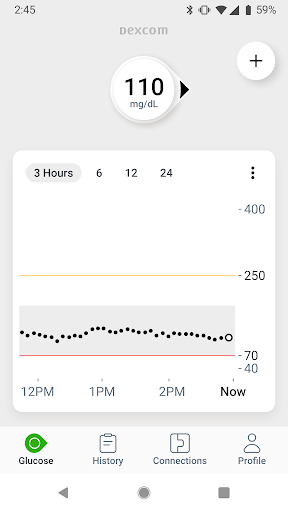
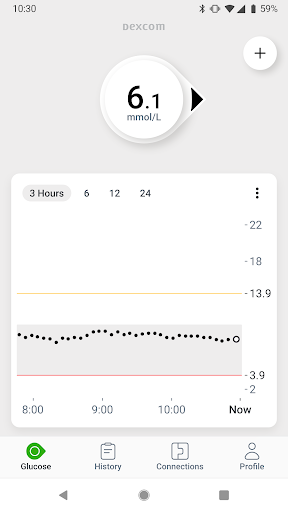
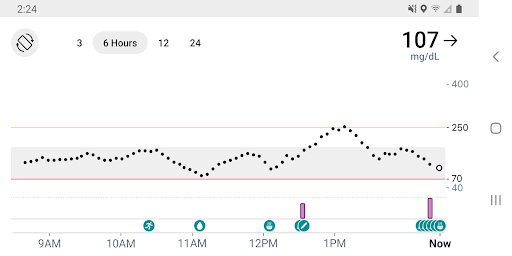
    "descriptionHTML": "Know your glucose number and where it’s heading with the Dexcom G7 Continuous Glucose Monitoring (CGM) System. <br><br>Only use this app if you have the Dexcom G7 CGM System.* Before you start making treatment decisions with Dexcom G7, work with your healthcare professional to learn how.<br><br>The Dexcom G7 Continuous Glucose Monitoring (CGM) System supports more empowered and integrated diabetes management. Its low-profile, wearable sensor provides real-time glucose data to a user’s compatible display device up to every 5 minutes, no fingersticks required.† <br>Dexcom G7 also offers customizable alerts that can help warn of high or low glucose levels, as well as remote monitoring and reporting options that help keep users connected to their loved ones and care teams anytime, anywhere.  <br><br>*The Dexcom G7 Android app is compatible with select Android devices only. To view a list of compatible devices, visit dexcom.com/compatibility.<br><br>†If your glucose alerts and readings from Dexcom G7 do not match symptoms or expectations, use a blood glucose meter to make diabetes treatment decisions.<br><br>In addition to the accurate performance provided by the Dexcom Sensor, you’ll receive other valuable features:<br>•\tShare your glucose data with up to 10 followers who can monitor your glucose data and trends on their compatible smart device with the Dexcom Follow app. Share and Follow functions require an internet connection<br>•\tClarity Clinic is now integrated into the G7 connections tab, making it easy to share data with your Clarity healthcare team  <br>•\tNow you can log your estimated fasting glucose in the Dexcom G7 app. Regularly tracking your fasting glucose allows you and your healthcare team to identify trends in your glucose levels<br>•\tDigital Health app integrations allow you to share your glucose data with third-party health apps and lifestyle devices<br>•\tNow you can see your health and activity data from connected apps and devices on your G7 trend graph<br>•\tDexcom Clarity summary insights are integrated into the G7 app, so that you can see both real-time and retrospective glucose insights from the same app<br>•\tQuick Glance allows you to view your glucose data on the lock screen of your smart device<br><br>G7 app features and partner integrations may differ by region.  Refer to your user guide for more information.",
    "androidMaxVersion": "VARY",
    "androidVersionText": "12",
    "earlyAccessEnabled": false,
    "developerInternalID": "Dexcom",
    "developerLegalEmail": "[email protected]",
    "isAvailableInPlayPass": false,
    "developerLegalPhoneNumber": "+1 858-230-9058"
  }
}
Categories (JSON)
[
  {
    "id": "HEALTH_AND_FITNESS",
    "name": "Health & Fitness"
  }
]
Raw scraper payload (JSON)
{
  "url": "https://play.google.com/store/apps/details?id=com.dexcom.g7&hl=en&gl=us",
  "free": true,
  "icon": "https://play-lh.googleusercontent.com/tIo6sDnGOlJCX-PJvLcSC4kZnk22uBdKxDOqPptbaPeS1wWT6IKf7YhXz0CfE6Po4a0",
  "appId": "com.dexcom.g7",
  "genre": "Health & Fitness",
  "price": 0,
  "score": 3.3467908,
  "title": "Dexcom G7",
  "genreId": "HEALTH_AND_FITNESS",
  "ratings": 12109,
  "reviews": 6084,
  "summary": "Dexcom G7 Continuous Glucose Monitoring",
  "updated": 1774545173000,
  "version": "2.11.2",
  "comments": [],
  "currency": "USD",
  "installs": "1,000,000+",
  "released": "Feb 13, 2023",
  "available": true,
  "developer": "Dexcom",
  "histogram": {
    "1": 3358,
    "2": 939,
    "3": 1265,
    "4": 1227,
    "5": 5314
  },
  "offersIAP": false,
  "priceText": "Free",
  "scoreText": "3.3",
  "categories": [
    {
      "id": "HEALTH_AND_FITNESS",
      "name": "Health & Fitness"
    }
  ],
  "adSupported": false,
  "description": "Know your glucose number and where it’s heading with the Dexcom G7 Continuous Glucose Monitoring (CGM) System. \n\nOnly use this app if you have the Dexcom G7 CGM System.* Before you start making treatment decisions with Dexcom G7, work with your healthcare professional to learn how.\n\nThe Dexcom G7 Continuous Glucose Monitoring (CGM) System supports more empowered and integrated diabetes management. Its low-profile, wearable sensor provides real-time glucose data to a user’s compatible display device up to every 5 minutes, no fingersticks required.† \nDexcom G7 also offers customizable alerts that can help warn of high or low glucose levels, as well as remote monitoring and reporting options that help keep users connected to their loved ones and care teams anytime, anywhere.  \n\n*The Dexcom G7 Android app is compatible with select Android devices only. To view a list of compatible devices, visit dexcom.com/compatibility.\n\n†If your glucose alerts and readings from Dexcom G7 do not match symptoms or expectations, use a blood glucose meter to make diabetes treatment decisions.\n\nIn addition to the accurate performance provided by the Dexcom Sensor, you’ll receive other valuable features:\n•\tShare your glucose data with up to 10 followers who can monitor your glucose data and trends on their compatible smart device with the Dexcom Follow app. Share and Follow functions require an internet connection\n•\tClarity Clinic is now integrated into the G7 connections tab, making it easy to share data with your Clarity healthcare team  \n•\tNow you can log your estimated fasting glucose in the Dexcom G7 app. Regularly tracking your fasting glucose allows you and your healthcare team to identify trends in your glucose levels\n•\tDigital Health app integrations allow you to share your glucose data with third-party health apps and lifestyle devices\n•\tNow you can see your health and activity data from connected apps and devices on your G7 trend graph\n•\tDexcom Clarity summary insights are integrated into the G7 app, so that you can see both real-time and retrospective glucose insights from the same app\n•\tQuick Glance allows you to view your glucose data on the lock screen of your smart device\n\nG7 app features and partner integrations may differ by region.  Refer to your user guide for more information.",
  "developerId": "Dexcom",
  "headerImage": "https://play-lh.googleusercontent.com/KNJCS73oPjeWwqBKsHd2ptxhSmDZblKYois9AgeLks-VvogRgz3MZlCJ09VqSZeo_Kk",
  "maxInstalls": 1733621,
  "minInstalls": 1000000,
  "preregister": false,
  "screenshots": [
    "https://play-lh.googleusercontent.com/aLSwSaQ6xzbfxNbhPC1nMZsuDQC3rjc4CZ_8Z38cFJ56RdozfW3rVmGr9P_hokB82u4",
    "https://play-lh.googleusercontent.com/HcZh_tmLUtPFSru1Q6T_3gd2PGng20eEY7oURSF5gGjkkTPnSSC0kJTfA6OTC5uSKQU",
    "https://play-lh.googleusercontent.com/5P2xLqz3KZiZCTDWClHnjbap18jP-Fn42kgz-Sk93l-64RFIY9HQ_8yap56NYghj5bU",
    "https://play-lh.googleusercontent.com/W7ONp7krnTF4dp_wYWrZgV3x4E-B_gS_g9llacHNWhOhTG6lZ65lshsI5mA-R6_Y2xU"
  ],
  "contentRating": "Everyone",
  "privacyPolicy": "https://www.dexcom.com/privacy-policy-global",
  "recentChanges": "Bug fixes and performance enhancements ",
  "androidVersion": "12",
  "developerEmail": "[email protected]",
  "descriptionHTML": "Know your glucose number and where it’s heading with the Dexcom G7 Continuous Glucose Monitoring (CGM) System. <br><br>Only use this app if you have the Dexcom G7 CGM System.* Before you start making treatment decisions with Dexcom G7, work with your healthcare professional to learn how.<br><br>The Dexcom G7 Continuous Glucose Monitoring (CGM) System supports more empowered and integrated diabetes management. Its low-profile, wearable sensor provides real-time glucose data to a user’s compatible display device up to every 5 minutes, no fingersticks required.† <br>Dexcom G7 also offers customizable alerts that can help warn of high or low glucose levels, as well as remote monitoring and reporting options that help keep users connected to their loved ones and care teams anytime, anywhere.  <br><br>*The Dexcom G7 Android app is compatible with select Android devices only. To view a list of compatible devices, visit dexcom.com/compatibility.<br><br>†If your glucose alerts and readings from Dexcom G7 do not match symptoms or expectations, use a blood glucose meter to make diabetes treatment decisions.<br><br>In addition to the accurate performance provided by the Dexcom Sensor, you’ll receive other valuable features:<br>•\tShare your glucose data with up to 10 followers who can monitor your glucose data and trends on their compatible smart device with the Dexcom Follow app. Share and Follow functions require an internet connection<br>•\tClarity Clinic is now integrated into the G7 connections tab, making it easy to share data with your Clarity healthcare team  <br>•\tNow you can log your estimated fasting glucose in the Dexcom G7 app. Regularly tracking your fasting glucose allows you and your healthcare team to identify trends in your glucose levels<br>•\tDigital Health app integrations allow you to share your glucose data with third-party health apps and lifestyle devices<br>•\tNow you can see your health and activity data from connected apps and devices on your G7 trend graph<br>•\tDexcom Clarity summary insights are integrated into the G7 app, so that you can see both real-time and retrospective glucose insights from the same app<br>•\tQuick Glance allows you to view your glucose data on the lock screen of your smart device<br><br>G7 app features and partner integrations may differ by region.  Refer to your user guide for more information.",
  "developerWebsite": "https://www.dexcom.com",
  "androidMaxVersion": "VARY",
  "androidVersionText": "12",
  "developerLegalName": "DexCom, Inc.",
  "earlyAccessEnabled": false,
  "developerInternalID": "Dexcom",
  "developerLegalEmail": "[email protected]",
  "developerLegalAddress": "6340 Sequence Dr, San Diego, CA 92121, United States",
  "isAvailableInPlayPass": false,
  "developerLegalPhoneNumber": "+1 858-230-9058"
}