Store listing captured Apr 11, 2026 at 16:01
Media
Header


Extended metadata (JSON)
{
"android": {
"comments": [],
"available": true,
"priceText": "Free",
"scoreText": "4.8",
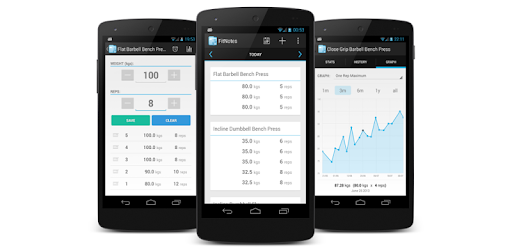
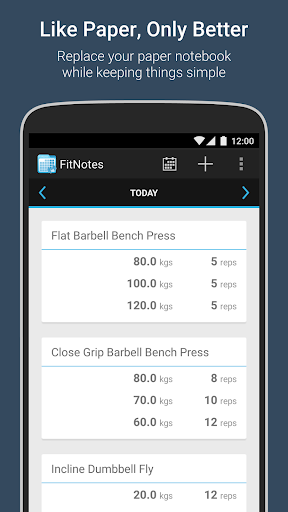
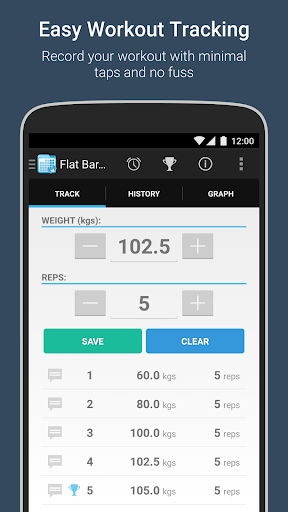
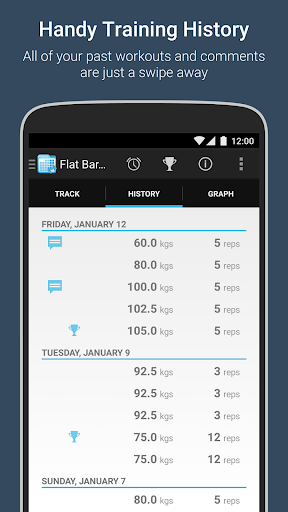
"descriptionHTML": "FitNotes is a workout tracker with a focus on simplicity and clean design. <br><br><b>Ad Free!</b><br><br><b>Workout Log</b><br>- View and navigate daily workout logs quickly by swiping between them<br>- Navigate to a specific day using the inbuilt calendar<br>- Add an exercise to the workout log and record sets of weight and reps or distance and time<br>- Swipe across when recording sets to view your workout history with the exercise<br>- Attach comments/notes to sets<br>- Rest timer with sound and vibration options<br>- Re-order exercises you've added to a workout log (long press an exercise card to initiate 'edit mode' and then press and drag the blue drag icon at the top right of the card)<br><br><b>Exercise Database</b><br>- Includes a default selection of categories (Chest, Back, Legs, etc)<br>- Each category contains a small default list of exercises<br>- Create custom categories to better suit your training program<br> - e.g. Olympic Lifts, Plyometrics, Ab Training, etc<br>- Add new exercises quickly using 'Save and New' feature<br>- Two exercise types: Resistance and Cardio<br> - Resistance - record training in weight and reps<br> - Cardio - record training in distance and time<br><br><b>Routines</b><br>- Create a routine to provide quick access to your most commonly used exercises<br>- Assign exercises to a particular day within the routine<br>- Name a day whatever you want (Monday, Chest Day, Workout A, etc)<br>- Select a single exercise from a day within the routine to add it to the training log<br> or hit 'Log All' to add an empty set for each exercise which can then be filled in later<br>- Create as many routines as you want and switch between them using dropdown list<br>- Remembers which routine you selected last<br><br><b>Calendar</b><br>- Dates on which you have recorded training logs are highlighted<br>- Tap a day in the calendar to display a popup listing the exercises performed on that day<br>- Navigate to a specific day's training log by selecting it in the calendar and hitting 'Go!'<br>- Filter which days are highlighted in the calendar<br>- e.g.<br> Highlight days where I did bench press and lifted more than 80kg for at least 5 reps<br> Highlight days where I ran outdoors and travelled more than 3 miles in less than 20 minutesr<br><br><b>Backup/Restore</b><br>- Backup your data to device storage or an online cloud service (DropBox or Google Drive - please ensure you have the corresponding apps installed on your device if you would like to backup to one of these services)<br><br><b>Export</b><br>- Export your training logs in CSV format so they can be analyzed in your spreadsheet application of choice<br><br><b>Permissions</b><br>- Modify or delete the contents of your USB storage: Required in order to be able to backup/export data to your device storage or sd card<br>- Control vibration: Used if you have selected the 'Vibrate' option for the rest timer<br>- Prevent device from sleeping: Required in order to ensure the rest timer continues to count down when the screen is off<br><br>If you have any feedback then please email [email protected]",
"androidMaxVersion": "VARY",
"androidVersionText": "10",
"earlyAccessEnabled": false,
"developerInternalID": "James+Gay",
"developerLegalEmail": "[email protected]",
"isAvailableInPlayPass": false
}
}Categories (JSON)
[
  {
    "id": "HEALTH_AND_FITNESS",
    "name": "Health & Fitness"
  }
]
Raw scraper payload (JSON)
{
"url": "https://play.google.com/store/apps/details?id=com.github.jamesgay.fitnotes&hl=en&gl=us",
"free": true,
"icon": "https://play-lh.googleusercontent.com/mvY8S6uxR1AmEEt9nqPfqvnefM5JWe74YbblFkjPt7LDGHC62UD988-soAvu83qG6hA",
"appId": "com.github.jamesgay.fitnotes",
"genre": "Health & Fitness",
"price": 0,
"score": 4.8426228,
"title": "FitNotes - Gym Workout Log",
"genreId": "HEALTH_AND_FITNESS",
"ratings": 30940,
"reviews": 5063,
"summary": "A clean, simple, powerful workout tracker. Free to use, and no ads - ever.",
"updated": 1761317742000,
"version": "25.1",
"comments": [],
"currency": "USD",
"installs": "1,000,000+",
"released": "Mar 16, 2013",
"available": true,
"developer": "James Gay",
"histogram": {
"1": 454,
"2": 302,
"3": 454,
"4": 1216,
"5": 28503
},
"offersIAP": false,
"priceText": "Free",
"scoreText": "4.8",
"categories": [
{
"id": "HEALTH_AND_FITNESS",
"name": "Health & Fitness"
}
],
"adSupported": false,
"description": "FitNotes is a workout tracker with a focus on simplicity and clean design. \n\nAd Free!\n\nWorkout Log\n- View and navigate daily workout logs quickly by swiping between them\n- Navigate to a specific day using the inbuilt calendar\n- Add an exercise to the workout log and record sets of weight and reps or distance and time\n- Swipe across when recording sets to view your workout history with the exercise\n- Attach comments/notes to sets\n- Rest timer with sound and vibration options\n- Re-order exercises you've added to a workout log (long press an exercise card to initiate 'edit mode' and then press and drag the blue drag icon at the top right of the card)\n\nExercise Database\n- Includes a default selection of categories (Chest, Back, Legs, etc)\n- Each category contains a small default list of exercises\n- Create custom categories to better suit your training program\n - e.g. Olympic Lifts, Plyometrics, Ab Training, etc\n- Add new exercises quickly using 'Save and New' feature\n- Two exercise types: Resistance and Cardio\n - Resistance - record training in weight and reps\n - Cardio - record training in distance and time\n\nRoutines\n- Create a routine to provide quick access to your most commonly used exercises\n- Assign exercises to a particular day within the routine\n- Name a day whatever you want (Monday, Chest Day, Workout A, etc)\n- Select a single exercise from a day within the routine to add it to the training log\n or hit 'Log All' to add an empty set for each exercise which can then be filled in later\n- Create as many routines as you want and switch between them using dropdown list\n- Remembers which routine you selected last\n\nCalendar\n- Dates on which you have recorded training logs are highlighted\n- Tap a day in the calendar to display a popup listing the exercises performed on that day\n- Navigate to a specific day's training log by selecting it in the calendar and hitting 'Go!'\n- Filter which days are highlighted in the calendar\n- e.g.\n Highlight days where I did bench press and lifted more than 80kg for at least 5 reps\n Highlight days where I ran outdoors and travelled more than 3 miles in less than 20 minutesr\n\nBackup/Restore\n- Backup your data to device storage or an online cloud service (DropBox or Google Drive - please ensure you have the corresponding apps installed on your device if you would like to backup to one of these services)\n\nExport\n- Export your training logs in CSV format so they can be analyzed in your spreadsheet application of choice\n\nPermissions\n- Modify or delete the contents of your USB storage: Required in order to be able to backup/export data to your device storage or sd card\n- Control vibration: Used if you have selected the 'Vibrate' option for the rest timer\n- Prevent device from sleeping: Required in order to ensure the rest timer continues to count down when the screen is off\n\nIf you have any feedback then please email [email protected]",
"developerId": "James+Gay",
"headerImage": "https://play-lh.googleusercontent.com/M47WTJd-v4FznaH3XLC8C9ng949Ggm37ho2ofsanGr2UOtjSapZNQj1Hc687GKLefADv",
"maxInstalls": 3989293,
"minInstalls": 1000000,
"preregister": false,
"screenshots": [
"https://play-lh.googleusercontent.com/bkZ7pD_hMtThGNuftguFtPalHjfFLG-Jax1SSOoXKO1XUbJ152MdaPUDavYs6YfZLkk",
"https://play-lh.googleusercontent.com/sBn7IpdKI2C3FN0ByEm2-ZaonElNHOb967thAQVOLzFrBUbBG-ID9Zj08gI1uisl3Vk",
"https://play-lh.googleusercontent.com/QCr_jMef_dFLE66Nzcy73j1wklxjohGtJjV-zb-9K0Qch0YuWgpwWc4j0OZE0CSjCA",
"https://play-lh.googleusercontent.com/82jxEKsIMEAh8oUCnPJOrVZIegLUjMF8DQSmK1tSAE9FQUcrc18mjIdRmyvEgu5pglg",
"https://play-lh.googleusercontent.com/5IxeFh9TNEwodRI-VvRcQYDTWJnlTyXYl5ei1u_hHi-uARb5UMSdTgUvc2jz3RHHmA",
"https://play-lh.googleusercontent.com/rz8A5pPdWFegx-TcwaIBb2QX9fwN03pGZDi0wktU2OrWgvAR1RgtHL74QCPuWYfBrUQZ",
"https://play-lh.googleusercontent.com/2_wdrwaWrIuAtvcbbJIoeIujfCNXnUcPAVVqoziI-qJJR9bQPEoJNNEs9kYBRwxZ-aWq",
"https://play-lh.googleusercontent.com/hWAZijhYmANWLBscPByZr2zJaHHCSYlMN64aRfwZplSg46YI822em81K3pMeTa-DNlY"
],
"contentRating": "Everyone",
"privacyPolicy": "http://www.fitnotesapp.com/privacy/",
"recentChanges": "Full change log will be displayed within the app but highlights include:<br><br>• Dark theme.<br><br>• Support for Android automatic backups.",
"androidVersion": "10",
"developerEmail": "[email protected]",
"descriptionHTML": "FitNotes is a workout tracker with a focus on simplicity and clean design. <br><br><b>Ad Free!</b><br><br><b>Workout Log</b><br>- View and navigate daily workout logs quickly by swiping between them<br>- Navigate to a specific day using the inbuilt calendar<br>- Add an exercise to the workout log and record sets of weight and reps or distance and time<br>- Swipe across when recording sets to view your workout history with the exercise<br>- Attach comments/notes to sets<br>- Rest timer with sound and vibration options<br>- Re-order exercises you've added to a workout log (long press an exercise card to initiate 'edit mode' and then press and drag the blue drag icon at the top right of the card)<br><br><b>Exercise Database</b><br>- Includes a default selection of categories (Chest, Back, Legs, etc)<br>- Each category contains a small default list of exercises<br>- Create custom categories to better suit your training program<br> - e.g. Olympic Lifts, Plyometrics, Ab Training, etc<br>- Add new exercises quickly using 'Save and New' feature<br>- Two exercise types: Resistance and Cardio<br> - Resistance - record training in weight and reps<br> - Cardio - record training in distance and time<br><br><b>Routines</b><br>- Create a routine to provide quick access to your most commonly used exercises<br>- Assign exercises to a particular day within the routine<br>- Name a day whatever you want (Monday, Chest Day, Workout A, etc)<br>- Select a single exercise from a day within the routine to add it to the training log<br> or hit 'Log All' to add an empty set for each exercise which can then be filled in later<br>- Create as many routines as you want and switch between them using dropdown list<br>- Remembers which routine you selected last<br><br><b>Calendar</b><br>- Dates on which you have recorded training logs are highlighted<br>- Tap a day in the calendar to display a popup listing the exercises performed on that day<br>- Navigate to a specific day's training log by selecting it in the calendar and hitting 'Go!'<br>- Filter which days are highlighted in the calendar<br>- e.g.<br> Highlight days where I did bench press and lifted more than 80kg for at least 5 reps<br> Highlight days where I ran outdoors and travelled more than 3 miles in less than 20 minutesr<br><br><b>Backup/Restore</b><br>- Backup your data to device storage or an online cloud service (DropBox or Google Drive - please ensure you have the corresponding apps installed on your device if you would like to backup to one of these services)<br><br><b>Export</b><br>- Export your training logs in CSV format so they can be analyzed in your spreadsheet application of choice<br><br><b>Permissions</b><br>- Modify or delete the contents of your USB storage: Required in order to be able to backup/export data to your device storage or sd card<br>- Control vibration: Used if you have selected the 'Vibrate' option for the rest timer<br>- Prevent device from sleeping: Required in order to ensure the rest timer continues to count down when the screen is off<br><br>If you have any feedback then please email [email protected]",
"androidMaxVersion": "VARY",
"androidVersionText": "10",
"developerLegalName": "James Richard Gay",
"earlyAccessEnabled": false,
"developerInternalID": "James+Gay",
"developerLegalEmail": "[email protected]",
"developerLegalAddress": "5 William Dennis Avenue, SWANSEA, SA4 6PD, United Kingdom",
"isAvailableInPlayPass": false
}